Reference
How Thinkube Control turns the model catalogue and your GPU nodes into served models behind one endpoint: states, loading, sizing, routing and authentication.
For most work, one sentence is enough: "load Qwen/Qwen3-8B on tkspark". This page says what each step means: the states a model passes through, how the platform sizes it to a node, how a request is routed to the right backend, and how a client authenticates at llm.<your domain>.
The LLM Gateway and AI Models pages of Thinkube Control offer the same operations.
The endpoint
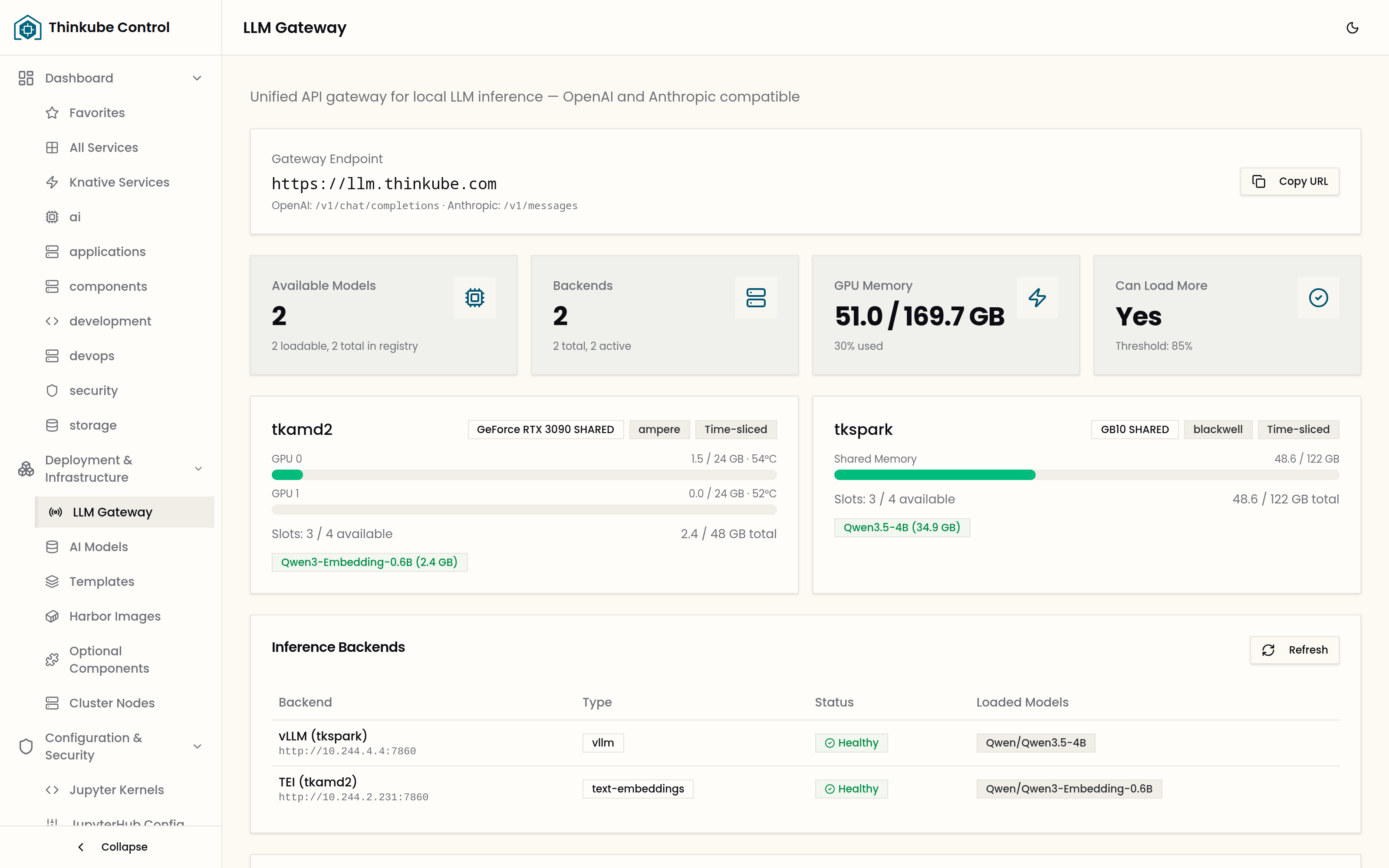
Clients call one address, the gateway at https://llm.<your domain>: it checks the caller’s token and sends each request to the backend serving the model. Thinkube Control decides where each model runs and sizes it to its node. The gateway serves:
| Route | API |
|---|---|
|
OpenAI chat completions |
|
OpenAI embeddings |
|
OpenAI model list |
|
Anthropic Messages |
A client written for either API works unchanged with the base URL changed to the gateway.
Authentication
Every route takes a token, either as Authorization: Bearer <token> or as an x-api-key header. Two kinds are accepted:
-
a Thinkube Identity access token, verified against the realm’s signing keys;
-
a Thinkube Control API token, which starts with
tk_, created under API Tokens and verified against Thinkube Control.
From a notebook or Thinkube IDE, get_openai_client() from the tk_llm package returns an OpenAI client already pointed at the gateway with a token.
Model states
registered
|
In the catalogue; weights not mirrored yet. |
deployable
|
Weights mirrored into Thinkube Storage and registered in Thinkube Experiments; can be loaded. |
loading
|
A serving pod is starting: image pull, weight load, warm-up. |
available
|
Serving; the gateway routes to it. |
unloading
|
Being removed. The pod is deleted when its last model leaves it. |
Backends
The inference engines are optional components you install; Thinkube Control offers only the ones present. Their pods start when a model is loaded.
| vLLM |
Full-precision text generation, one pod per model. |
| TensorRT-LLM |
NVIDIA’s inference engine, one pod per model; the catalogue entries built for it carry NVFP4 quantisation for Blackwell. |
| Ollama |
Quantised GGUF models; one pod hosts several models. |
| text-embeddings |
Text Embeddings Inference, for embedding models. |
Mirroring
A model must be in the catalogue shown on AI Models before it can be mirrored. Mirroring downloads the weights from Hugging Face once into Thinkube Storage, and registers the model in Thinkube Experiments. Submit it from AI Models or with submit_model_mirror; follow it with get_mirror_status. A gated model needs its licence accepted on Hugging Face by the account whose token the installer stored.
Loading
Load from the Load dialog on the LLM Gateway page or with load_llm_model. The options:
| node |
The GPU node. Without it, the node with the most AI memory left and a free slot takes the model. |
| tier |
|
| backend |
A backend type instead of a tier, or a backend by id as |
| max_context_length |
Caps the context window. The KV cache grows with it, so a serving-sized value such as 8k to 32k uses far less memory than the model’s full window. Without it, Thinkube Control picks the largest of 32k, 16k or 8k that the model supports and the node has memory for. The answer names the node and the context chosen. |
| keep_alive |
Ollama only: how long the model stays loaded after its last request. |
| num_speculative_tokens |
For models with a speculative-decoding configuration, the draft depth for this load. |
get_llm_load_options answers before anything is loaded: the compatible backends, the GPU nodes with their free slots and remaining budget, and the estimated memory.
A vLLM, TensorRT-LLM or embeddings deployment serves one model per node. A load of a second model onto a node whose deployment already serves one is refused, naming the model: unload it, or choose another node.
Sizing
Thinkube Control sets GPU and pod memory for you. It measures the checkpoint’s real size and adds the KV cache and a framework overhead. When speculative decoding is configured, it also adds the drafter’s weights. From that it derives a utilisation fraction and a memory request that fit the node’s AI budget. A model that would not fit is refused with the reason. On a unified-memory node such as a DGX Spark, the budget is a fixed ceiling below the physical memory, so the operating system and the platform keep room.
Speculative decoding
Two methods, chosen per model in the catalogue’s speculative_config:
-
MTP, a multi-token-prediction head inside the model;
-
DFlash, a separate small drafter model. The catalogue names the drafter; at load time Thinkube Control resolves it to its mirrored weights and loads it beside the target. A drafter is mirrored and sized like any model but is never offered for loading on its own.
num_speculative_tokens is the draft depth. A larger value can be faster when drafts are accepted and costs memory that would otherwise be KV cache.