Thinkube GitOps
Convert papers to Markdown and JATS XML
Turn PDF papers into structured text with Docling, on CPU in a pipeline step or with a vision model on your GPU
- Level
- intermediate
- Time
- 30 min
- Risk
- low
- Updated
- 2026-10-04
Overview
Basic idea
A PDF stores where text sits on a page, not what the text is. To search papers, index them for a research assistant or deposit them in a repository, you need the structure back: title, abstract, sections, tables, figure captions, references. Docling, an open-source toolkit started at IBM Research, recovers that structure and writes it as Markdown, HTML or JSON. The app adds JATS XML, the tag set PubMed Central uses for articles.
The Docling template is a complete app, and it shows how the parts of Thinkube work together:
-
The web app template. A page to upload a PDF and read the results, a login through Thinkube Identity, a history in PostgreSQL, and API tokens for scripts.
-
Argo Workflows. Each conversion runs as a workflow step in the app’s own image, so a long conversion never holds a web request open.
-
Thinkube Storage. The PDF, the outputs and Docling’s models reach the step as files. The platform gives the step its storage access.
-
The LLM Gateway. Granite-Docling, a small model (258 million parameters) that reads page images, runs on a GPU. The step sends one request per page, as a client of the gateway.
What you’ll accomplish
You load Granite-Docling on an RTX 3090, deploy the app as docling, convert an open-access medical paper with both pipelines, and check that the JATS output is valid against the JATS 1.4 schema.
What to know before starting
Required
-
Asking your agent in Thinkube IDE to do things on the platform.
Optional
-
Run a pipeline from your app: the
workflowsservice the conversion steps use. -
Load a model on the node and context you choose: the load options.
-
How configuration reaches your app: secrets and dependencies.
Supported hardware
-
GPU: not needed for the conversion steps. Granite-Docling is served behind the LLM Gateway on a GPU node.
-
Architecture: amd64 or arm64: the app’s image is built for both, so it runs on any node.
Prerequisites
Platform
-
Thinkube running, with Thinkube IDE open. Ask your agent: "what’s running?"
-
A Thinkube Control API token stored as
THINKUBE_API_TOKENon the Secrets page, for the Granite-Docling pipeline. Ask your agent: "is THINKUBE_API_TOKEN on the Secrets page?" If not, create a token under API Tokens in Thinkube Control and add it on Secrets. Without it, the app offers only the standard pipeline.
Components
-
vLLM. Ask your agent: "is vLLM installed?" If it is not, ask "install vLLM".
Instructions
Step 1. Load Granite-Docling
Granite-Docling answers through the gateway like any chat model: it takes a page image and returns DocTags, Docling’s markup for layout, tables and formulas. It is in the model catalogue, served by vLLM.
Ask your agent:
› mirror ibm-granite/granite-docling-258M and load it on tkamd2 with an 8k context
Replace tkamd2 with one of your nodes.
The reference run is one run on the test cluster this page was checked on. Expected output, from the reference run:
status: succeeded          (mirror, 60 s)
state: loading
message: Loading on tkamd2 with a 8192 token context; this takes some minutes
backend_id: vllm-tkamd2
The engine’s log on the reference run:
Model loading took 0.49 GiB memory and 7.895869 seconds
GPU KV cache size: 993,248 tokens
The model takes the whole GPU while loaded.
Step 2. Deploy the app
Ask your agent:
› make an app called docling from the Docling template
The template is https://github.com/thinkube/tkt-docling.
Expected output, from the reference run:
status: success
output: Deployment completed successfully
duration: 309.8
The app’s thinkube.yaml declares what it needs from the platform, and the platform provides it:
services:
  - database
  - workflows            # each conversion is a workflow step

dependencies:
  - name: llm-gateway
    type: llm-proxy      # resolved to the gateway's address in the cluster
    env: LLM_GATEWAY_URL

env:
  - name: GRANITE_DOCLING_MODEL
    default: "ibm-granite/granite-docling-258M"
Its manifest.yaml declares THINKUBE_API_TOKEN under secrets, so the deploy copies that secret into the app.
Step 3. Convert a paper on the page
The paper is a study protocol from PLOS ONE, Impact of two endotracheal tube fixation on the incidence of peri-oral lesions (doi:10.1371/journal.pone.0297349, CC BY 4.0), 15 pages with a structured abstract, figures and 23 references.
Open https://docling.<your domain>/ and sign in. Drop the PDF on New conversion, leave Standard and the formats Markdown and JATS XML, and press Convert. The row shows Queued, then Running, then Done with the page count and the time Docling took.
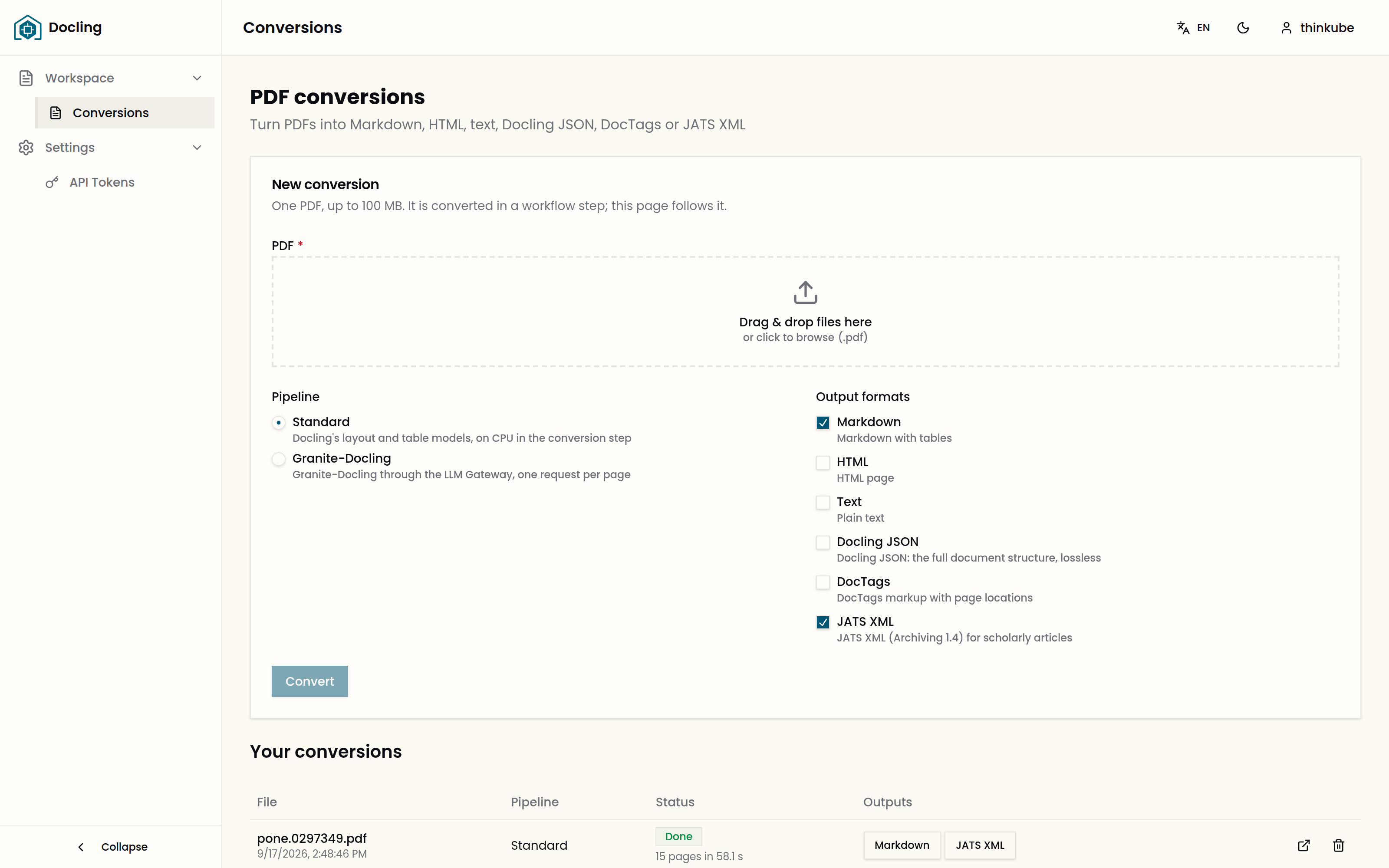
Each format button opens the output, with a Download button:
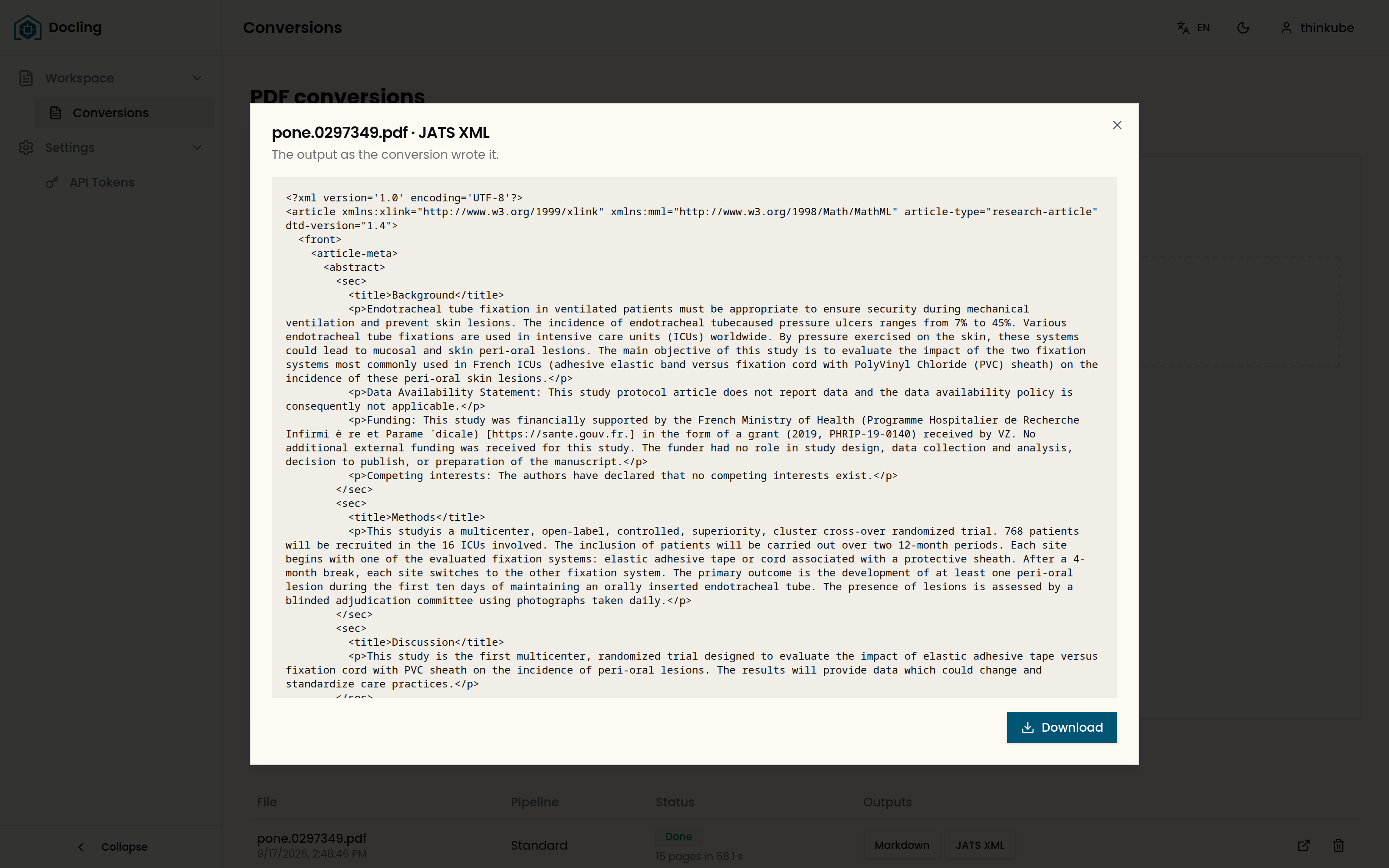
The first standard conversion also runs a prepare-models step, which downloads Docling’s layout and table models into the app’s space in Thinkube Storage. Later conversions read them from there.
Step 4. Convert with Granite-Docling through the API
The page uses the same API your scripts call. Create a token on the app’s API Tokens page and give it to the agent as DOCLING_TOKEN.
Ask your agent:
› convert pone.0297349.pdf in docling with granite-docling to every format, using the token in DOCLING_TOKEN, and download the results
The agent posts the file to /api/v1/conversions, reads the conversion until it is succeeded, and downloads each output.
Expected output, from the reference run:
$ curl -H "Authorization: Bearer $DOCLING_TOKEN" -F file=@pone.0297349.pdf \
    -F pipeline=granite-docling -F formats=markdown,html,text,json,doctags,jats \
    https://docling.thinkube.com/api/v1/conversions
{"id":"6c750aed-…","pipeline":"granite-docling","status":"queued",
 "workflow_name":"docling-convert-n5bnc",…}

$ curl -H "Authorization: Bearer $DOCLING_TOKEN" https://docling.thinkube.com/api/v1/conversions/6c750aed-…
{"status":"succeeded","pages":15,"seconds":15.2,…}

markdown 43832 bytes   html 49076   text 43638   json 692300   doctags 61242   jats 50812
| Call | Does |
|---|---|
|
The pipelines and formats, and whether Granite-Docling is available. |
|
Stores the PDF and submits its workflow. |
|
Your conversions, newest first, with their status. |
|
One output; add |
|
Removes the conversion, its PDF and its outputs. |
Step 5. Compare the two pipelines
The pipelines read a page in different ways. The standard pipeline finds the layout with Docling’s models and takes the text from the PDF’s own text layer; Granite-Docling reads the page image and returns layout and text together. On this paper the text layer splits accented letters, and the image does not.
Ask your agent:
› compare the affiliations line in docling's standard and granite-docling Markdown for pone.0297349.pdf
Expected output, from the reference run:
standard         1 Service de Me ´decine Intensive Re ´ animation, …
granite-docling  1 Service de Médecine Intensive Réanimation, …
| On the reference run | Standard | Granite-Docling |
|---|---|---|
Runs on |
CPU, in the step |
a GPU, through the gateway |
Docling time for 15 pages |
58.1 and 124.8 s |
15.2 s |
Whole workflow |
99 and 162 s |
38 s |
Needs |
Docling’s models in Thinkube Storage |
the model loaded, |
Step 6. Check the JATS output
The template writes JATS: it maps Docling’s document onto JATS 1.4 and validates the result in its tests.
Ask your agent:
› validate docling's JATS output for pone.0297349.pdf against JATS Archiving 1.4 and compare it with the publisher's JATS for the same article
Expected output, from the reference run, for the standard pipeline:
| docling | Publisher | |
|---|---|---|
Valid against JATS Archiving 1.4 |
yes |
— |
Abstract sections |
Background, Methods, Discussion, Trial registration |
the same |
References |
23 |
23 |
Figures |
3 |
3 |
Article title |
— |
present |
Sections in the body |
15, all at one level |
30, under 4 at the top |
The Granite-Docling output is valid too, with the same abstract sections and 23 references, and 2 figures.
The front matter, the part before the abstract, is kept as text in <notes notes-type="front-matter">. Docling did not find a title on this paper’s first page, so the title is missing.
Step 7. Next steps
To undo: Unload the model with "unload ibm-granite/granite-docling-258M", and delete the app in Thinkube Control.
-
Build a research assistant over your papers: index the Markdown in a vector store and ask questions with sources.
-
Run a pipeline from your app: the workflows service on its own.
-
Templates catalog: every template you can deploy.
Troubleshooting
| Symptom | Cause | Fix |
|---|---|---|
A Granite-Docling call through the gateway answers text with no structure: no |
The request asked the server to strip special tokens, |
Send |
A PDF gives Docling what is printed, in reading order: authors, affiliations and journal details come out as text rather than metadata fields, each reference is one <mixed-citation> string, a first-page sidebar can land inside the abstract, and figures carry their captions without the images. The standard pipeline runs no OCR, so it needs a PDF with a text layer.